Appearance
Packing work orders and internal services: status rules
When a unit that is about to be packed and shipped has an open internal service (INT), the ERP keeps the statuses of its packing work order (PA) in step with that INT automatically. This page lists the rules: which INTs count for a PA, what the PA's Internal status shows, and when the PA moves to Additional checking and back.
1. Where you see it
Open a packing work order (document type Packing Work Order). Under Basic information, next to Status, is the Internal status. On a PA it is filled in by the ERP only — you cannot change it by hand. It shows how far the repair of the PA's units has got (see step 5).
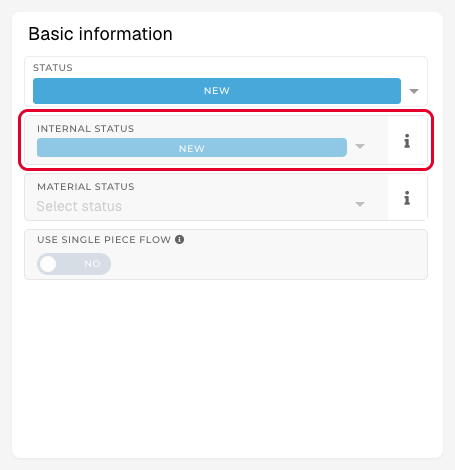 Internal status of a packing work order
NOTE
Every status the ERP sets here is recorded under the system user, so in the status history you can tell an automatic change from a change made by a person.
2. Link an INT to a packing item
Open the item's Internal services (INT) section. Linked INTs are listed with their serial number and status; pick another one in Select an internal service to link and click Link, or remove one with Unlink. Linking puts the INT's serial number on the item.
 Linked INTs on a packing item
An INT can only be linked when:
- its serial number is of the same product as the packing item,
- the INT is not Away, Repaired, Closed or Canceled,
- the serial number is not already on another packing work order that is still open (not Closed or Canceled),
- the item still has room for a serial number. A placeholder ("to be defined") serial number on the item is replaced by the INT's one.
3. Which INTs count for a PA
An INT counts for a packing work order when it is not Closed or Canceled and its serial number is:
- on an item of the PA — linked as in step 2, or added to the item in any other way,
- reserved on an item of the PA — the unit is physically booked to the PA,
- on an item of any work order below the PA — its child work orders, their children, and so on.
All three affect the Internal status. Only the second one — reserved units — can move the PA to Additional checking (step 6).
4. The INT's rework status
Every INT has its own Rework status, set automatically from its error-tracking tasks (Level 1 error, Level 2 error, Level 3 error). You can show it as a column on the Internal services list. The ERP checks these rules from top to bottom and uses the first one that matches:
| Rework status | When |
|---|---|
| In progress | a Level 2 or Level 3 error task is in progress |
| Repaired | the INT itself is Repaired, or all its level tasks are closed and at least one of them is a Level 2 or Level 3 task |
| Pending | the Level 1 error task is closed (the error is found), but the repair has not started |
| New | anything else — nothing has been done on the INT yet |
Canceled level tasks are ignored.
5. The PA's Internal status
The PA's Internal status is the rework status of the INT that is furthest behind, among all INTs that count for it (step 3). From furthest behind to done:
New → Pending → In progress → Repaired
So one INT that nobody has looked at yet keeps the PA on New, even when every other unit is already repaired. The PA shows Repaired only when all of its INTs are repaired.
When no INT counts for the PA any more (all are closed or canceled, or their units were removed), the Internal status is cleared — whatever it was before, including a value someone set in the past.
TIP
Example: a PA has two units with INTs. INT A has its Level 1 error task closed (Pending), INT B has a Level 2 error task in progress (In progress). The PA shows Pending. When INT A's repair starts, the PA moves to In progress; when both are repaired, to Repaired; when both INTs are closed, the Internal status is empty again.
6. Additional checking
The PA's main Status is changed only in these two cases, and only for INTs on units reserved on the PA:
- PA is in Quality control and a reserved unit has an INT that is New, Pending or In progress → the PA moves to Additional checking.
- PA is in Additional checking and none of its reserved units has such an INT any more (repaired, closed, canceled or unreserved) → the PA goes back to the status it had before Additional checking, normally Quality control.
A PA in any other status — New, In progress, Ready for delivery, … — keeps its status; only its Internal status changes.
NOTE
An INT whose unit is only linked to the PA item, or sits on a work order below the PA, updates the Internal status but never moves the PA to Additional checking.
7. When the ERP checks again
The statuses are recalculated right away when:
- an INT is created, or its status changes (closing an INT also closes all of its tasks),
- a Level 1, Level 2 or Level 3 error task changes status,
- a serial number is added to or removed from an item of the PA, or an item of a work order below it.
A packing work order that is Closed, Canceled or Shipped is never changed.
WARNING
Reserving or unreserving a unit on the PA does not trigger a check. A unit reserved on a PA in Quality control is picked up the next time its INT or one of the INT's level tasks changes status.
8. Optional: block finishing quality control
Your administrator can turn on a setting that stops the quality control task of a packing item from being closed while one of the PA's units still has an INT that is not Repaired, Closed or Canceled. Closing the task then fails with Quality control can not be completed while internal services are open: followed by the INT numbers. This check looks at the serial numbers on the PA's items. The setting is off by default.
9. Demo sales orders
Demo orders follow a similar rule. While any unit on a work order of a demo sales order has an open INT, the order is set to In service; when none is open any more, it goes back to Quality control. It is checked when an INT's status changes and when serial numbers on its work order items change. Demo orders that are Closed, Canceled, Shipped or Converted to rental are left alone.