Appearance
Fixed assets
Fixed assets (osnovna sredstva) are company equipment tracked individually — machines, tools, computers and other long-lived items, as opposed to stock that gets consumed. The ERP keeps each asset’s acquisition value, depreciates it every month and prepares the postings for accounting.
From purchase to write-off
This is the life of a fixed asset in the ERP, with the guide for each step:
- Set up the ledger account of the asset’s product type with its depreciation accounts — Set up depreciation accounts.
- Create the fixed asset — Create a new fixed asset.
- Link the received invoice items to the asset when you enter the supplier’s invoices — Link received invoice items to fixed assets — and check that they add up to the asset’s amount — Check the acquisition value.
- Activate the asset when it is put into use. This prints the transfer-to-use record — Activate fixed assets.
- Every month, once the month has ended: recalculate the postings — Fixed asset account card — and download the journal for Business Central — Export the depreciation journal.
- When part of an asset is sold or scrapped, record a partial liquidation — Partially liquidate a fixed asset. When the whole asset goes out of use, set its Liquidation date.
Everything that happened to an asset is listed in its event history. To change an asset’s data, see Update an existing fixed asset.
1. Open Fixed assets
Go to Products > Fixed assets. The table lists every fixed asset. The values in the amount columns (current value, depreciation, …) are calculated for the Calculation date at the top — today, unless you pick another day.
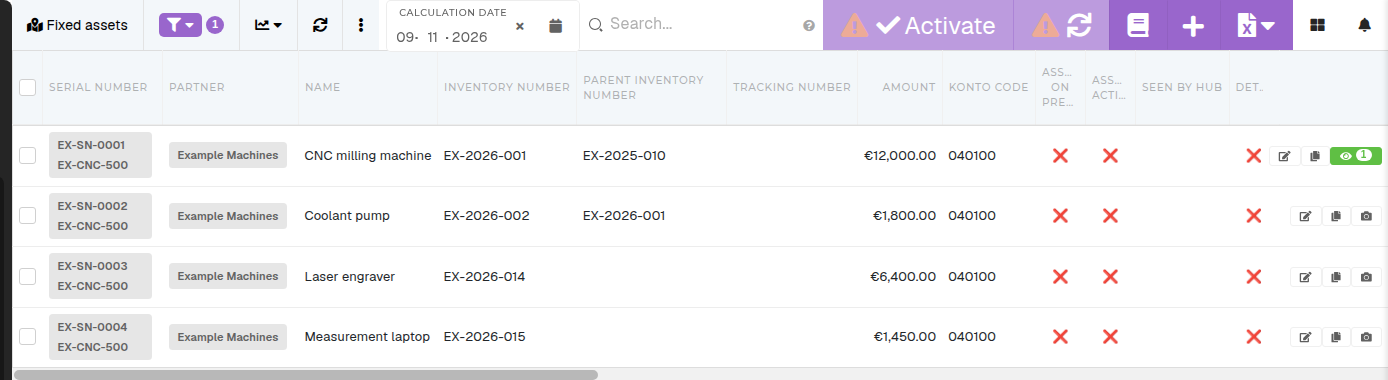 The Fixed assets list
The Parent inventory number column shows which main asset a part belongs to, and the Comments column the comments written on each asset.
2. Open an asset’s documents
An asset with attached files has a green eye button with the number of files in its row. Click it to see the files and open one — for example the transfer-to-use record created at activation. Click New to scan another document with the camera. Assets without files show only the camera button.
 The files of an asset
How depreciation is calculated
The ERP uses straight-line depreciation in whole months:
- The useful life is 100 ÷ Depreciation rate years — 20 % gives 5 years, or 60 months.
- The monthly depreciation is the Amount (acquisition value) divided by the number of months: 12,000 € at 20 % is 200 € a month.
- Depreciation starts with the month of the Activation date, and that month counts in full, whatever the day. An asset activated on 10 January 2026 is depreciated for the whole of January.
- The month of the Liquidation date also counts in full.
- The book value never goes below 0 — depreciation simply stops when the asset is fully depreciated.
- An asset that is not activated, or has no depreciation rate, is not depreciated.
- After a partial liquidation the remaining value keeps depreciating over the original useful life, so the monthly amount gets smaller.
When you pick the serial number of an asset with no Depreciation rate yet, the rate of its product classification is filled in. You can change it on the asset.
NOTE
The Parent inventory number has no effect on depreciation — each asset is depreciated on its own.