Appearance
Useful filters for purchase order suggestions
Two saved filters that turn Purchase order suggestions into a daily to-do list, and why this is faster than the old way of ordering.
Why this is faster than the old way
| Before: Required materials + a new purchase order | Now: Purchase order suggestions | |
|---|---|---|
| Find what to order | Read the Required materials report, then check every product against open purchase orders and stock by hand | One list, ranked by urgency, with need, stock, Ordered quantity, Days to order and Deficit date side by side |
| Create the order | Create a purchase order: pick the supplier, add every item, type quantity, price and delivery date | Tick the rows and click once — one purchase order per supplier, already filled in (how) |
| Do it again tomorrow | Set the report filters up again | Click a saved filter; a This month date range moves with the calendar |
1. Open the filters
Click the filter icon next to the page title. Click a field’s funnel icon on the left to add it to Selected filters. See Filters for the basics.
2. Example: delays this month, without circuits
Products production needs this month whose order date has already passed, although a purchase order for them is open — what is on order is not enough or arrives too late. Chase the supplier, or order the rest.
- Already ordered: on
- Days to order:
<0— the order date has passed - Required quantity for production:
>0— production needs it - Product type: Reselling products, switched to Exclude
- Deficit date: This month — stock runs out this month
- Product classification: every circuit classification and Printed circuit board, switched to Exclude — circuits have their own filter (below)
Click Apply, then type a name in Enter new filter name and click + to keep it.
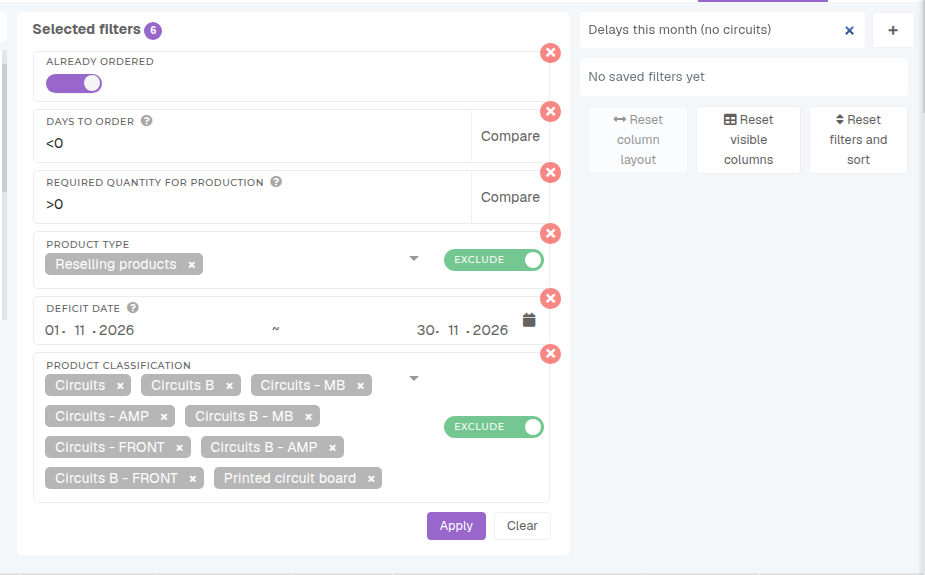 The filter for this month’s delays, ready to save
3. Example: circuits released for production
Circuit suggestions only for revisions Released for production, among circuits that are already on order — review circuit orders in one place, and never order a revision that is not released yet.
- Product classification: every circuit classification and Printed circuit board (Only)
- Revision status: Released for production (Only)
- Already ordered: on
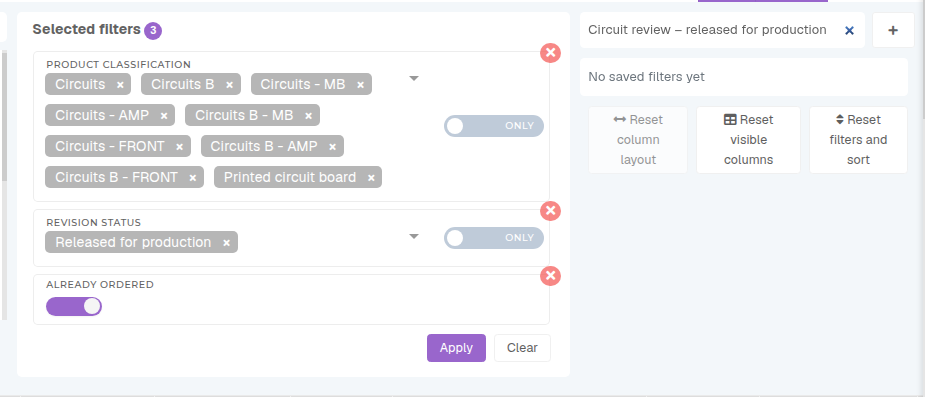 The circuit review filter, ready to save
NOTE
Already ordered on shows only products with an open purchase order that is not fully delivered yet. Click the switch again to turn it off and see only products with nothing on order — the ones to order first.
TIP
Pick This month (or another shortcut) for a date filter instead of typing dates: the saved filter then always shows the current month. A saved filter’s star makes it your default view, and the clock icon e-mails its results to you every day — see Filters.