Appearance
Demo order management
How to loan equipment to a customer as a demo or rental, with full stock tracking.
- Create the equipment as products, if they don’t already exist, classified as Fixed assets Equipment.
- Raise a purchase order referencing the demo order’s document number, with the fixed-asset products as line items — this is what gives them stock tracking.
- Receive the goods. Create a goods receipt for the purchase order, booking the items into stock as fixed asset equipment.
- Create the sales order. Make a new sales order with document type Rental Order or Demo Order, add the demo products, and fill in the Rental and consignment information section that appears once that document type is picked.
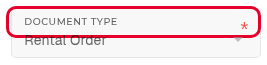 Picking a rental or demo document type
- Pack and ship. Create a packing work order via Create packing for selected order items, enter the products’ serials, then add a shipping list from + Documents once packing is done.