Appearance
Fixed asset account card
The account card (kartica osnovnega sredstva) lists every posting of one fixed asset — its acquisition, the monthly depreciation and any (partial) liquidation — with a running book value. It is also the source for the monthly depreciation journal.
1. Open the account card
Open a fixed asset and click the Account card tab.
 The Account card tab
2. Read the postings
Each row is one posting, oldest first. Acquisition value is the debit side, Value adjustment the credit side, and Balance the book value after that posting.
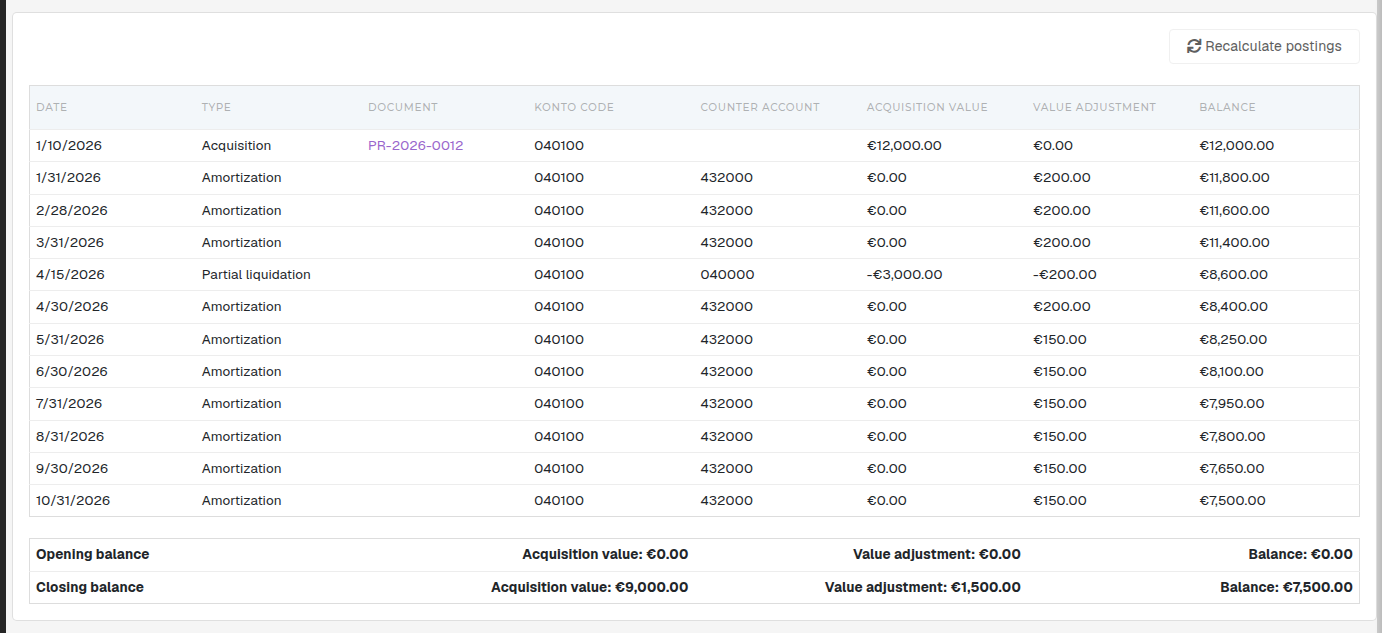 The account card of the example machine
The rows in this example belong to a machine bought for 12,000 € with a 20 % depreciation rate (5 years, 200 € a month), activated on 10 January 2026. On 15 April 3,000 € of it was partially liquidated, so from then on the remaining 9,000 € depreciates by 150 € a month.
| Type | When | What it posts | Counter account |
|---|---|---|---|
| Acquisition | On the activation date | The acquisition value (Amount of the asset) as a debit. Document links to the received invoice. | — |
| Amortization | On the last day of every finished month (in the month of liquidation: on the liquidation date) | That month’s depreciation as a value adjustment | The ledger account’s Depreciation account |
| Partial liquidation | On the partial liquidation date | Removes the liquidated part: the acquisition value (negative debit) and the depreciation that part had already collected (negative value adjustment) | The ledger account’s Konto code usage |
| Liquidation | On the Liquidation date | Removes the rest of the asset, so the balance ends at 0. Document links to the goods write-off. | The ledger account’s Konto code usage |
Konto code on every row is the Konto code of the asset’s ledger account. The accounts come from the ledger account of the asset’s product type — see Set up depreciation accounts.
3. Read the opening and closing balance
Below the postings, Opening balance shows the totals before the From date and Closing balance the totals at the end of the period. The closing Balance is the asset’s current book value. Pick a From and To date at the top to look at one period only, for example a year.
 Opening and closing balance
4. Recalculate the postings
Click Recalculate postings to add the postings that are missing up to today — for example the depreciation of the month that has just finished.
 The Recalculate postings button
 The postings are recalculated
IMPORTANT
Postings are not created automatically. Nothing appears on the account card until someone clicks Recalculate postings, and a month’s depreciation can only be posted once that month has ended. Recalculate before you export the depreciation journal — the export refuses to run while postings are missing.
To recalculate many assets at once, tick them on the Fixed assets list and click the Recalculate postings button (the two arrows icon) in the top bar.
WARNING
Recalculate postings only adds missing postings — it never changes or removes the ones already on the card. If you change something that affects months that are already posted, the old postings stay as they were:
- changing the Amount keeps the old acquisition posting,
- changing the Depreciation rate does not correct depreciation already posted,
- adding a partial liquidation with a date in an already posted month does not correct the depreciation of the months after it,
- deleting a partial liquidation leaves its posting on the card.
Make such changes before the affected months are posted, and check the account card afterwards.
NOTE
Changing Konto code, Konto code usage or Depreciation account on the ledger account updates the accounts on the postings that already exist.