Appearance
Check the acquisition value
A fixed asset can be paid with several received invoices — for example the machine itself and its installation. The Acquisition value tab lists every received invoice item linked to the asset and compares their total with the asset’s Amount.
1. Open the acquisition value
Open a fixed asset and click the Acquisition value tab.
 The Acquisition value tab
2. Compare the invoices with the amount
The table lists the invoice items with their invoice, supplier, ledger account (Konto code) and net amount. Items in another currency are converted to euro with the invoice’s exchange rate (Net amount EUR). Below the table:
- Invoice items total — the sum of Net amount EUR,
- Acquisition value — the asset’s Amount,
- Difference — between the two. It turns red when they don’t match.
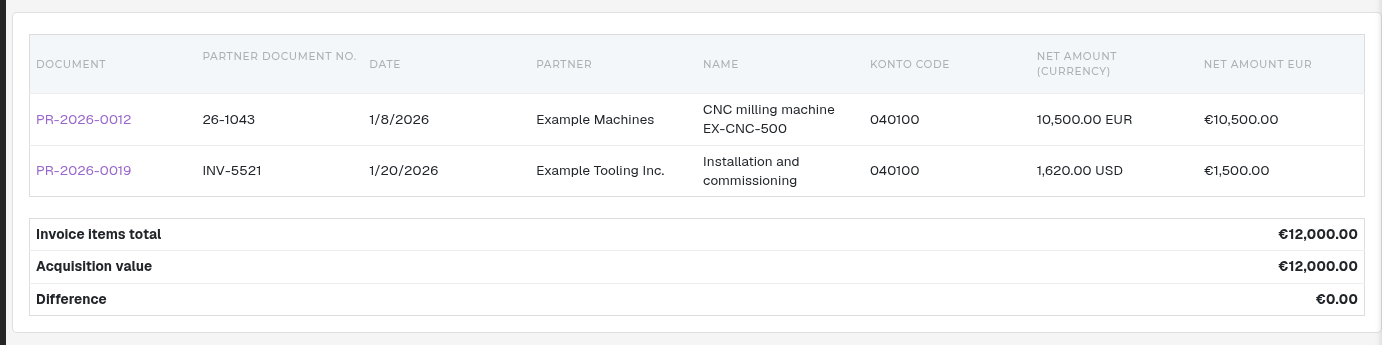 Two invoices that add up to the acquisition value
3. Fix a difference
Here the installation invoice is not linked yet, so the items add up to less than the Amount. Link the missing invoice item to the asset, or correct the Amount on the Basic information tab.
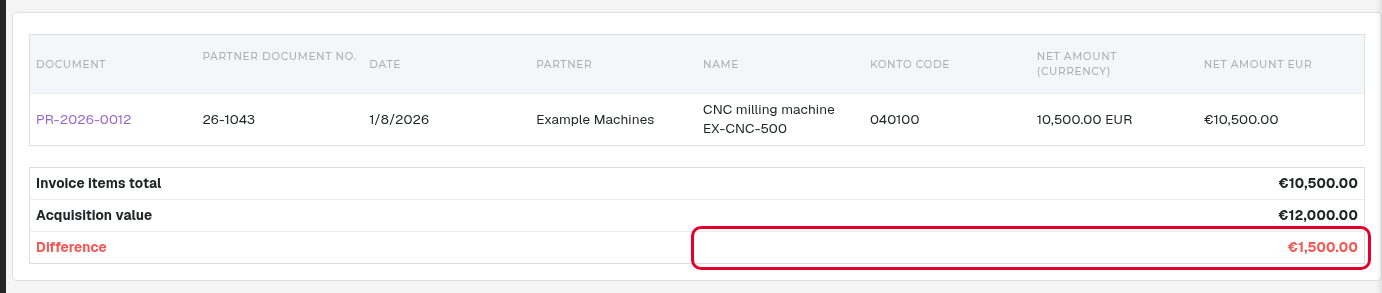 A difference of 1,500 €
IMPORTANT
Linking invoices never changes the asset’s Amount — you enter it yourself. The Amount is what gets depreciated and what the account card and the transfer-to-use record show, so keep it equal to the invoice items total.
Invoice items are linked to an asset on the received invoice, with the Inventory number field of each item — see Link received invoice items to fixed assets. The linked invoices are also added to the asset’s Invoices field automatically.