Appearance
Twig base templates: invoice and CRM quote
The ERP ships two Twig base templates: invoice-base for issued invoices and quote-crm-base for CRM quotes. Each contains the whole document split into blocks, so a new invoice or quote layout is usually a few lines that extend the base and override a block or two. This page lists what each base offers, with examples that are rendered by the real template engine every time this guide is regenerated, and ends with notes for developers. How to use the editor is described in Write a Twig template.
1. How the templates fit together
- Base and default. A base template holds the whole document; its default (
invoice-default,quote-crm-default) is the single line{% extends '…-base' %}. Both are shipped inactive. Make your own template by extending the base instead of editing it. - Loaded by slug.
extends,include,importandfromload other templates by their Slug, from the same tenant. Only Twig templates can be loaded: a placeholder template with the same slug is not found. Templates are read from the database on every print, so there is no cache to clear after a change. - A change to a base changes every child. Editing
invoice-basechanges every template that extends it on that tenant. Preview the children afterwards. - CSS order. After rendering, the CSS of the
templates_settingsoption, of the template type and of the template’s own CSS field is appended to the HTML, in that order. It comes after the base’s own styles, so the CSS field wins over the base for equal selectors. - The layout picks the PDF engine.
no-margin(the quote) is printed by WeasyPrint, which supports CSS paged media:@pagesizes and margins, running footers, page counters, flexbox. Every other layout (header-footerfor the invoice,no-header, …) is printed by wkhtmltopdf, an old WebKit without flexbox or grid. Withheader-footerthe page header (logo, company, QR code of the document number) and footer (company data, bank accounts) are fixed Blade partials, not Twig blocks — chooseno-headerto print without them.
2. Know the data every template gets
Open the Variables tab in the editor to see the whole tree for a record. The top-level variables are:
| Variable | Contents |
|---|---|
record | The record’s columns as stored (columns marked not_printable in the model’s configuration are left out), plus every belongsTo relation of its configuration under the relation’s name: record.partner.short_name, record.currencyCode.symbol, record.contactPerson.email. |
issuer | The company issuing the document — the record’s company partner when it has company_id, otherwise the root partner: short_name, long_name, vatid, registration_number, phone, logo_url, footer_info, address (address1, post, city, country), bank_accounts[] (bank, iban, swift; transactional accounts only). |
| model data | Variables added by the model’s templateData() — invoice, lines, totals, settings for invoices; quote, items, optional_items, alternative_items, technical_items, financial for quotes. |
labels | Invoices and quotes: the texts of the code list invoice_issued_translations / order_quote_translations for the current language (or its default value), e.g. labels['QUOTE.LBL']. |
assets | print_css (shared print stylesheet) and img_dir (print images), as file paths for the PDF engine. |
The data a model adds are raw values — dates as 2026-10-05, amounts as numbers — so format them in the template with |date and |number_format. The exceptions are items and financial: they are the pre-formatted strings of the older Blade prints (amount_formatted, total_formatted, …). The quote base prints those, so quote prices come already formatted.
WARNING
record holds everything that is printable, including related users’ e-mail addresses (record.createdByUser.email). Print only what the document needs.
3. Use the invoice data
invoice-base prints these variables, built by FormatInvoiceIssuedForTemplateTask:
| Variable | Contents |
|---|---|
invoice | document_number, payment_reference (the number without INV-/CRN-), reference_number, currency_code, date_invoice, date_payment, date_service (empty for proformas), is_credit_note, is_proforma, parent (the credited invoice: document_number, date_invoice), billing_address and shipping_address (company, address1, address2, post, city, country, vatid), shipping_dates[], orders[] (document_number, parent_document_number), delivery_notes[], rma_numbers[], calibrations[], shipment (providers[], tracking_numbers[], terms_of_trade[]), rental_periods[] (from, to), print_footer, additional_text (HTML), legal_notes (HTML), export_declaration (text, signed_by), zddv_76a (tax_rate, amount_total, amount_vat), clause (sl, en), tax_register (zoi, eor, qr_value), signature (department, name, signer_image_url, user_image_url, signatures[]) |
lines[] | One per top-level invoice item: name, sku, tariff_code, label_prefix (Rental of, Service of, Calibration of), reference_number, children[] (names of the sub-items), origin_country, other_info, serial_groups[] (serial_numbers, is_long), amount, discount_rate, amount_discount, quantity, tax_rate, amount_total |
totals | currency_code, packaging, shipping, financing (net_total, rate, amount), show_vat, show_tax_rate_column, net_total, vat_rates[] (tax_rate, amount_vattable, amount_vat), total, prepayments[] (date, amount, net_amount, vat_amount), remaining |
settings | show_serials (the option show_serials_on_default_invoice), always_show_origin_country |
Optional parts are null or an empty list when the invoice has none, so test them with {% if invoice.shipment %} or {% if invoice.orders is not empty %}.
4. Override the invoice blocks
Every part of invoice-base is a block you can replace or extend with {{ parent() }}. The blocks from addresses to tax_register sit inside body, in this order:
| Block | Prints |
|---|---|
title | the HTML title, Invoice INV-… |
head | nothing — for extra <style> or <link> tags |
body | the whole document |
addresses | the billing and shipping address columns |
document_info | the rows on the right: document type and number, reference, credited invoice, dates, orders, delivery notes, RMA, shipment |
rental_periods | Rental period from … to … |
calibrations | the calibration numbers |
items_table | the whole items table, with items_head, item_row and totals inside |
items_head | the header row of the items table |
item_row | one row per invoice line — it runs inside {% for line in lines %}, so line is available |
totals | the rows under the items: handling fee, shipping, financing, VAT, invoice total, prepayments, remaining amount |
print_footer | the invoice’s print footer |
additional_text | the additional text |
export_declaration | the export declaration and its signature line |
zddv_76a | the tax specification for ZDDV article 76.a |
clause | the invoice clause in Slovenian and English |
payment_info | When paying, please refer to the invoice number |
legal_notes | the legal notes |
signature | the print signer and signature images, or the Invoiced by list |
tax_register | ZOI, EOR and the fiscal QR code |
Before body, the base sets helper variables that your blocks can use: show_serials, currency, items_colspan (columns of the items table), totals_colspan and vat_label_colspan.
5. Change the invoice
Each example is a complete template. Paste it into a Twig template whose document type is Issued Invoice.
Add a row under the totals. {{ parent() }} keeps the base’s rows:
twig
{% extends 'invoice-base' %}

{% block totals %}
    {{ parent() }}
    <tr>
        <td class="text-right small-text py-10" colspan="{{ items_colspan }}">
            Prices include delivery to the address above.
        </td>
    </tr>
{% endblock %}
Add CSS. Use the head block for styles that belong to the template, or the template’s CSS field:
twig
{% extends 'invoice-base' %}

{% block head %}
    <style>
        .bold-text { color: #c8102e; }
    </style>
{% endblock %}
Change how a line is printed. Keep the cells in step with items_head — the serial-number and tax-rate columns are optional:
twig
{% extends 'invoice-base' %}

{% block item_row %}
    <tr>
        <td class="text-left py-10 vertical-align-top">{{ line.tariff_code }}</td>
        <td class="text-left py-10 vertical-align-top">
            <span class="bold-text">{{ line.name }}</span>
        </td>
        {% if show_serials %}
            <td class="text-left py-10 vertical-align-top">
                {{ line.serial_groups|column('serial_numbers')|join(', ') }}
            </td>
        {% endif %}
        <td class="text-right py-10 vertical-align-top">{{ line.amount|number_format }}</td>
        <td class="text-right py-10 vertical-align-top">{{ line.discount_rate|number_format }}</td>
        <td class="text-right py-10 vertical-align-top">{{ line.amount_discount|number_format }}</td>
        <td class="text-right py-10 vertical-align-top">{{ line.quantity|number_format }}</td>
        {% if totals.show_tax_rate_column %}
            <td class="text-right py-10 vertical-align-top">{{ line.tax_rate|number_format(1, ',', '') }} %</td>
        {% endif %}
        <td class="text-right py-10 vertical-align-top">{{ line.amount_total|number_format }}</td>
    </tr>
{% endblock %}
Hide the serial-number column:
twig
{% extends 'invoice-base' %}
{% set settings = settings|merge({show_serials: false}) %}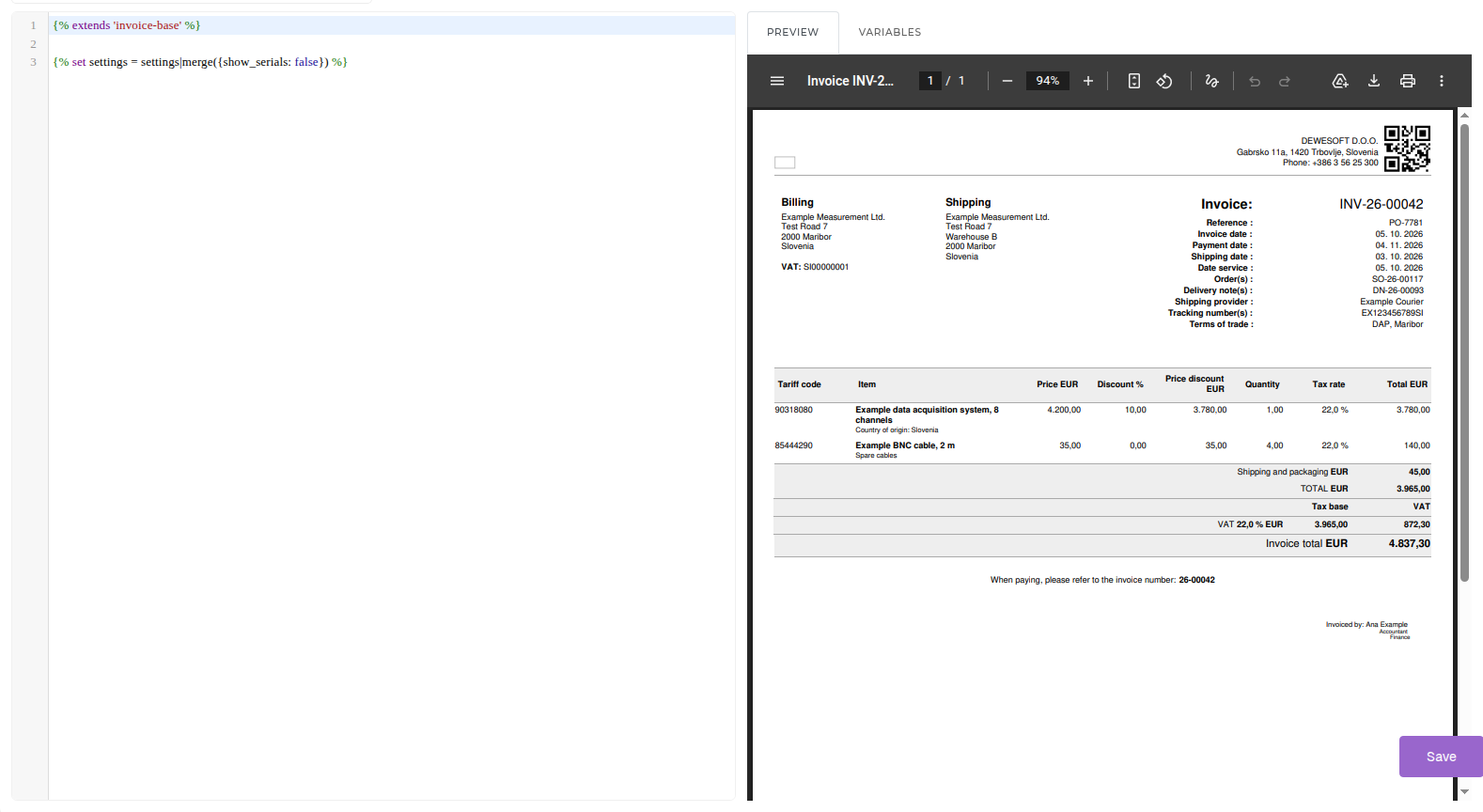 The invoice without the serial-number column
IMPORTANT
{% set show_serials = false %} has no effect: your template’s top-level set tags run first, and then invoice-base sets show_serials, currency and the column counts from settings and totals. Change those inputs, as above, instead of the helper variables.
6. Use the quote data
quote-crm-base prints these variables, built by FormatOrderQuoteForTemplateTask and the quote’s PDF formatting:
| Variable | Contents |
|---|---|
quote | document_number, reference_number, issue_date, closing_date, sales_person (name, job_title, avatar_url, personal_message, company_name, address, email, phone — the sales person’s quote details when they use them), customer (name, contact_name, contact_email, address), shipping_address and billing_address (company, address1, address2, post, city, state, country, contact_name, contact_email; billing also vatid), supplier (name, vatid, address — HQ when the opportunity issues the PO to HQ), terms (payment_term, financing_rate, delivery_term, date_delivery_agreed, lead_time, warranty), additional_note (HTML), terms_and_conditions (HTML), system_schematics[] (image URLs) |
items[], optional_items[], alternative_items[] | The overview rows, pre-formatted: numbering, reference_number, product_name, amount_formatted, discount_rate_formatted, quantity_formatted, total_formatted, row_class, style_class, level, is_group, is_spacer, is_upgrade, is_calibration, is_wrapper_header, serial_data, tariff_code, and children[] — sections with section_label, show_section_header and their own items[] |
technical_items[] | The technical description rows: reference_number, description (HTML), has_description, scope_of_supply (HTML), has_scope_of_supply, image_url, level, show_header_row, row_class, children[] (sections, as above) |
financial | Pre-formatted totals: currency_code, show_discount_column, show_alt_opt_discount_column, discount_flat, discount_total, financing_amount, financing_rate, shipping_amount, shipping_method, has_vat, vat_rate_amounts[] (tax_rate_name, tax_rate, amount_vat), amount_base_vat_currency, amount_total_currency |
labels | Every text of the quote, e.g. labels['QUOTE.OVERVIEW.LBL']. Translate them in the code list order_quote_translations; they may contain HTML, so the base prints most of them with |raw. |
7. Override the quote pages
The quote is printed page by page; each page is a block inside body:
| Block | Prints |
|---|---|
title | the HTML title, Quote QUO-… |
styles | all of the quote’s CSS — override it with {{ parent() }} to add rules |
head | nothing — for extra tags |
footer | the running page footer, from the labels QUOTE.FOOTER.CONTENT_CENTER or QUOTE.FOOTER.CONTENT_LEFT |
front | the cover: number, reference, dates, Prepared by and Prepared for |
intro | the page about the company |
partners | the partners and references page |
overview | the items table, with totals and alternative_optional_items inside |
system_schematics | the system schematics, if the quote has any |
technical | the technical descriptions |
contact | terms and notes, with supplier_info, addresses, terms, additional_note and sales_person inside |
terms_and_conditions | the terms and conditions of sale, if the quote has them |
outro | the back cover |
- Theme.
{% set dark = false %}prints the light theme: white cover images and thelight-modeCSS class instead ofdark-mode. The base defaults to dark. - Macros. The base defines
overview_row(item, show_discount, labels),overview_items_head(labels, currency_code, show_discount),technical_heading(labels),technical_row(item, labels)andaddress_lines(address). Import them into your template with{% from 'quote-crm-base' import address_lines %}.
8. Change the quote
Each example is a complete template with the same Document type as Quote CRM - default (Twig). The default prints the dark theme:
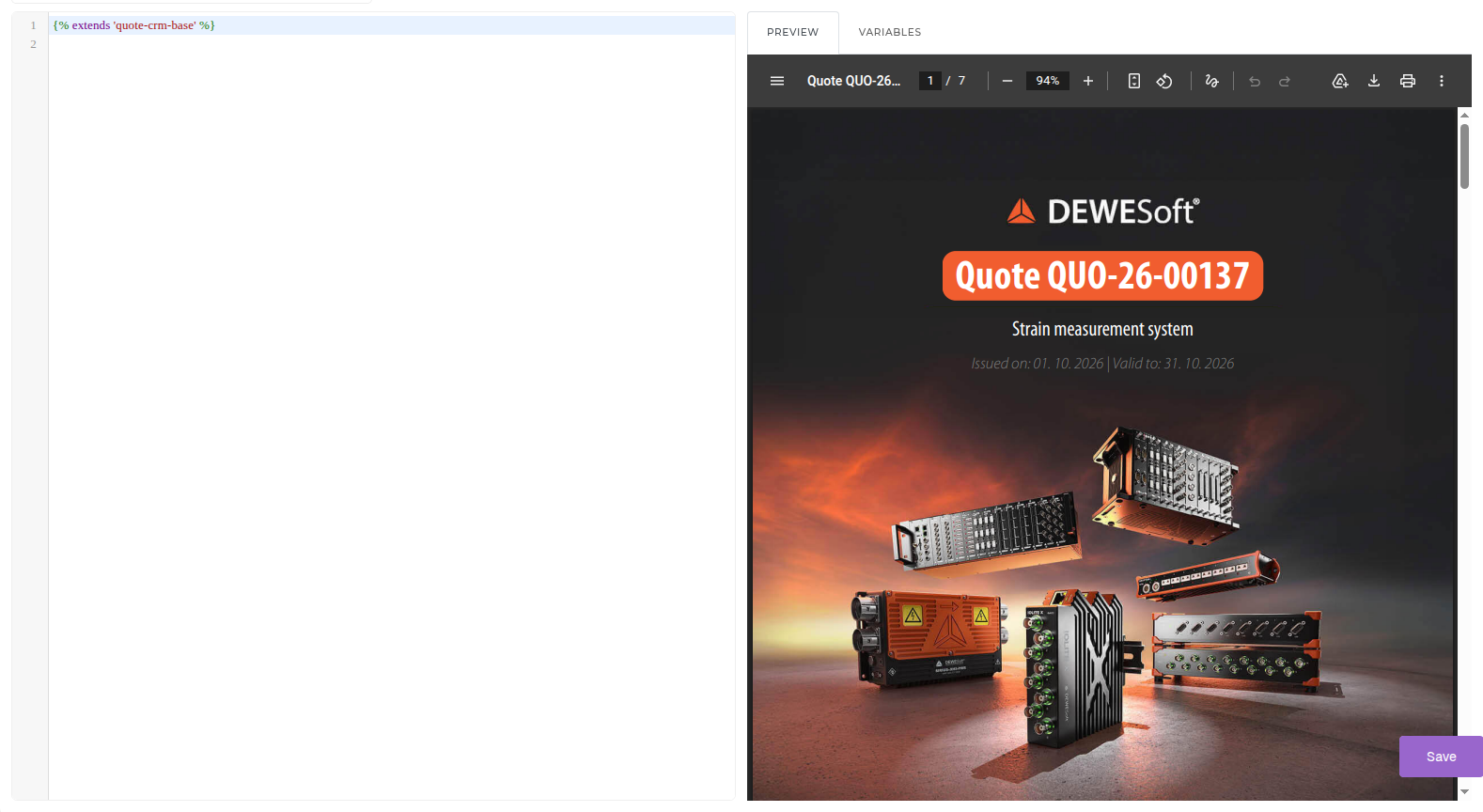 The quote cover in the dark theme
Print the light theme and leave out two pages:
twig
{% extends 'quote-crm-base' %}
{% set dark = false %}
{% block intro %}{% endblock %}
{% block partners %}{% endblock %}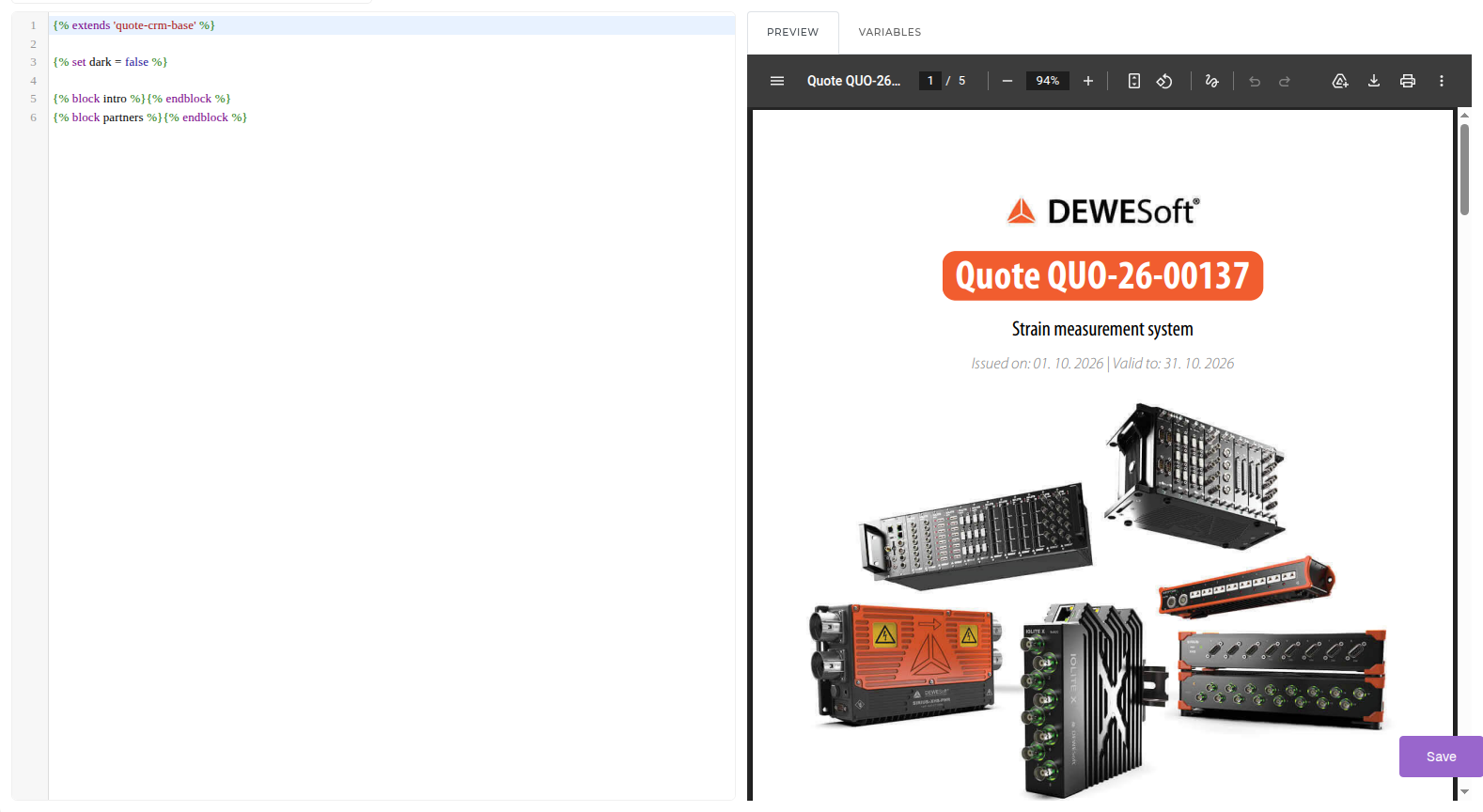 The light theme, with five pages instead of seven
Add CSS on top of the base’s styles:
twig
{% extends 'quote-crm-base' %}

{% block styles %}
    {{ parent() }}
    <style>
        .subheading { color: #1f6feb; }
    </style>
{% endblock %}
Reuse a macro of the base — here to print the delivery address under the notes:
twig
{% extends 'quote-crm-base' %}
{% from 'quote-crm-base' import address_lines %}

{% block additional_note %}
    {{ parent() }}
    <div class="sub-subheading">Delivery address</div>
    <div class="notes-box">
        {{ address_lines(quote.shipping_address) }}
    </div>
{% endblock %}
9. For developers: give a document type its own Twig data
Any model can be printed with Twig as soon as a template uses its document type: it gets record and issuer. Add model data when the document needs logic — chosen addresses, totals, conditions:
- Add
templateData(): arrayto the model, by convention in its print trait (InvoiceIssuedPrint,OrderQuotePrint).GetTwigTemplateDataTaskmerges the returned keys afterrecordandissuer. - Build the array in a task named
Format<Model>ForTemplateTask(seeFormatInvoiceIssuedForTemplateTaskandFormatOrderQuoteForTemplateTask):snake_casekeys, raw values (floats, dates asY-m-d), andnullor[]for parts the record doesn’t have, so templates can test them with{% if %}. Leave formatting to the template. - Return only arrays and scalars. The data go through
json_encode/json_decodebefore rendering, and the sandbox doesn’t allow calling methods on objects. - Write a test like
InvoiceIssuedTemplateDataTest: assert the top-level keys, that the data survive a JSON round trip, and render the seeded template withPrintByTemplateDocumentTask.
10. For developers: ship or change a base template
- Put the template in
app/Containers/Template/Data/CriticalData/Twig/<slug>.html.twig. - Add a row to
TwigTemplatesCriticalData.php:slug,name,enginetwig,activefalse,template_type_id1(Print),document_type_id,layout,landscape, andcontentread withfile_get_contents. - Seed it:
php artisan tenancy:seed-tenant-critical-data --tenants=<tenant> --tables=templates. - Add it to
CreateTemplateTest::testCreateAcceptsTheShippedTwigInvoiceTemplates, which saves the shipped templates through the API and so checks them against the sandbox.
WARNING
Critical data are matched by slug, and TwigTemplatesCriticalData.php has no update_values, so existing rows are never updated. A change to a shipped .twig file does not reach a tenant that already has the template. Ship the change with a migration that updates content — update_values would also overwrite any edits made to the template in the ERP.
11. For developers: change the sandbox
- The allowed tags, filters and functions are the constants
ALLOWED_TAGS,ALLOWED_FILTERSandALLOWED_FUNCTIONSinCreateTwigEnvironmentTask. The policy is strict, so a new filter added withaddFiltermust also be listed inALLOWED_FILTERS. - The same task sets the default date and number formats and the
assetsglobal. - Templates are edited in the ERP by its users. Don’t allow anything that reads files, environment or constants, or calls methods on objects.
12. For developers: debug a template
POST /v1/templates/{id}/render-preview renders a template for one record without saving anything — it is what the editor calls:
| Parameter | Value |
|---|---|
modelId | id of the record to render |
output | data — the variables (the Variables tab); html — { "html": …, "error": … } with the error’s message, line, template and in_current_template; pdf — the PDF |
content, css, layout, landscape | optional unsaved values to render instead of the saved ones |
It needs the update-templates permission and permission to view the template’s model. The tests in RenderTwigTemplateTaskTest and RenderTemplatePreviewTest show the engine’s behaviour: extending inactive templates, include by slug, escaping, the sandbox and error reporting.