Appearance
Set up depreciation accounts
A fixed asset takes all of its accounts from a ledger account: the one of the product type of the asset’s product. Set the depreciation accounts on that ledger account once, and every asset of that product type is posted and exported with them.
1. Open the ledger account
Go to Ledger accounts and open the ledger account of the asset’s product type.
2. Fill in the depreciation accounts
In Basic information, next to Konto code and Konto code usage, fill in the Depreciation account (konto amortizacije) and the Accumulated depreciation account (konto popravka vrednosti). Then click Save.
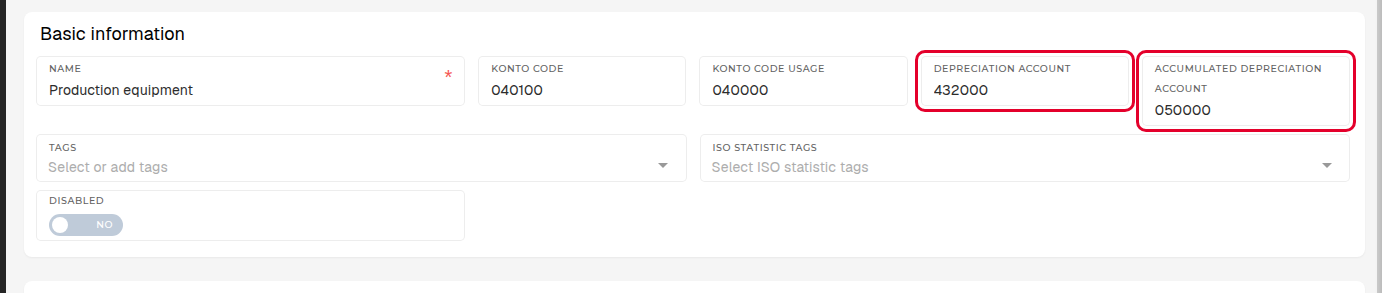 The depreciation accounts of a ledger account
How each account is used:
| Field | On the asset’s account card | In the depreciation journal | |
|---|---|---|---|
| Konto code | konto | Konto code of every posting | — |
| Konto code usage | konto uporabe | Counter account of liquidations and partial liquidations | Counter account of Izločitev / Delna izločitev — the acquisition value is removed from it |
| Depreciation account | konto amortizacije | Counter account of the monthly depreciation | Account of Amortizacija — the depreciation expense |
| Accumulated depreciation account | konto popravka vrednosti | — | Counter account of Amortizacija and Odpis, account of Izločitev / Delna izločitev |
WARNING
- The account card and the journal do not use the same accounts: the card shows the Konto code, the journal never does. In the journal the asset’s acquisition value sits on the Konto code usage.
- The write-off line Odpis always uses account 720010; it can’t be set on the ledger account.
- The journal export stops when the Depreciation account, Accumulated depreciation account or Konto code usage is empty, or when two of them that face each other are the same.
NOTE
When you change the Konto code, Konto code usage or Depreciation account, the postings already on the account cards of the assets with this ledger account are updated to the new accounts — except the counter account of partial liquidation postings, which keeps the old one.
3. Require an inventory number on invoices
In Accounting, switch on Inventory number required for ledger accounts that are used for fixed assets. Every received invoice item booked on this ledger account then has to be linked to a fixed asset.
 The Inventory number required switch
See Link received invoice items to fixed assets. The three new fields are also available as columns on the Ledger accounts list (hidden by default).